I have a new toy: A Dell Latitude 10 tablet running Windows 8. As I’m a Dell Guy now, I’m not going to review it: Conflict of interest, you know.

But there are limits to my self-restraint, and besides, I haven’t yet run across an unbiased comparison of iPads and any-brand Windows 8 tablets — certainly not any that concentrate on what KJR’s readers care about most: getting work done.

Summary first: Windows 8 tablets win. By a big margin.

The specifics:

Windows 8 loses a bit on fit and finish. Microsoft just can’t seem to polish everything to a shine. The iPad is far slicker and smoother.

Never mind the dual UI problem (the desktop plus the “Modern” interface — the one with the big tiles). It might be kludgey, but I don’t have a better idea for one system that spans smartphones, tablets, and full-size computers.

No, the problem is that Microsoft botched the desktop interface. Three examples:

Pinch and zoom isn’t included. Except when it is. Sometimes, pinch-and-zoom works, for example, to adjust the text size in Internet Explorer or an Office (2013) document. Sometimes it doesn’t, like when you’re looking at the main Outlook display, or want to make the Ribbon or some other controls bigger.

I’m sure the design decision was made by highly trained user-interface professionals. Speaking as a highly unsophisticated szhlub who has to make sense of it, occasional pinch-and-zoom is better than nothing, but still irritating.

Keyboard madness: On the desktop, bring up a form. Any form. Tap your finger into a field on the bottom half of your screen. Up pops the onscreen keyboard, just as it should, hiding the input field, just as it shouldn’t.

Windows don’t stay put. Go to the desktop. Open a few applications. Rotate the tablet (in tablet mode) to a vertical orientation. Now rotate it back to horizontal. Note how every window has changed size, proportions, and position.

C’mon, boys and girls. It’s annoying little details like these that pile up into a general sense of your ineptitude.

Nonetheless, Windows 8 tablets beat iPads for business use, because …

Office matters: Windows 8 tablets run Windows. More important, they run Windows applications. Like, for example, Office.

iOS apps have corrupted too many Word documents. For self-protection I only work with disposable copies anymore.

Then there’s what all of the various iOS Office-replacement apps do to PowerPoint presentations — garble all but the simplest slides.

Most travelers need to (at least) view and review PowerPoint presentations and Word documents. With a Windows 8 tablet they can, without ever scratching their heads, wondering what the original looked like.

Note-taking: With Office comes OneNote. If that doesn’t do it for you, you can license InfoSelect, which, in spite of recent challenges with quality assurance, is absolutely awesome for organizing all the bits and pieces of information you otherwise wouldn’t know what to do with. And for finding it when you need it. Both are far superior to anything you can run on an iPad.

Styli (styluses?): Here’s one place Windows 8 wins on cosmetics.

First, it just inks better. My on-screen handwriting and printing are actually better than their pen and paper counterparts, because Windows 8 inks to sub-pixel resolution. The iPad? Your fingertip.
Inking might not seem like a big deal when you’re sitting at a desk where you can type, but the thing is, you aren’t always sitting at a desk. When you’re holding a tablet in one hand, writing is a lot faster and easier than one-handed typing.

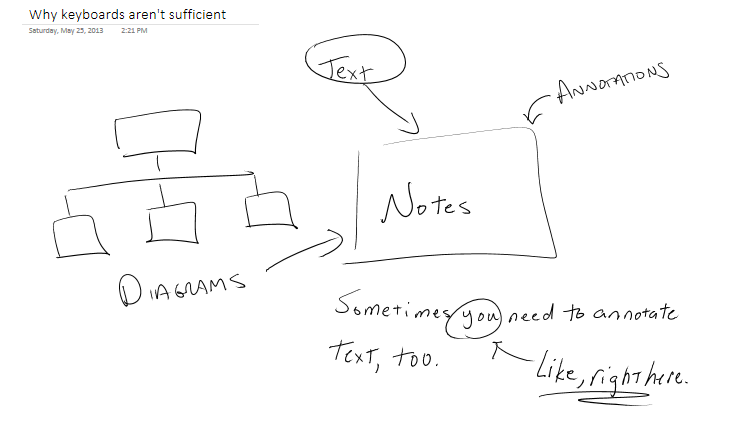
And if you’re thinking note-taking with a stylus is so last-century, here’s a point: You can’t take all the notes you need to take with a keyboard. Take a look at the figure and you’ll understand the limitations keyboards bring to the note-taking party.

Then comes the coup de grace: Handwriting recognition. You can hand-write your notes and then turn them into text, with spectacular accuracy.

And it’s built into the OS as a service, so any place you use the on-screen keyboard you can also use the stylus to write your entries. Again, not a big deal at a desk, but imagine the possibilities for people who work while moving around … you know, doctors, nurses, plumbers, people like that.

Opinion: If you want to haul around just one system that handles everything (except phone calls) a Windows 8 tablet is your best choice. It’s good enough for entertainment (watching Netflix, reading Kindle books and so on).

And when you have to get down to work, even with all the aggravations there’s really no contest.
Enterprise technical architecture management (ETAM) is a topic I’ve probably written too much about already. That’s the price you pay for not paying for your reading material.

Let’s start here: Even atheist programmers know how God was able to create the entire universe in only six days: He, she, or it (KJR takes no position on deistic gender) didn’t have an installed base to worry about.

Same coin, opposite side: Clayton Christensen, in his milestone book The Innovator’s Dilemma, recommends that any company wanting to launch a new venture that falls outside its current comfort zone should incubate it as an entirely separate business, in a different location, with a different infrastructure, success metrics … everything.

Entirely irrelevant to this discussion, but it just occurred to me and I’m feeling impulsive today (see “price you pay for not paying,” above): A common mistake in mergers-and-acquisitions circles is ignoring the obverse of this point. When large corporations acquire small entrepreneurships, they often move them over to the large-corporate systems and infrastructure. It’s a seemingly logical move — a step toward achieving the acquisition’s so-called synergy targets.

It’s a great example of the Great Theory But syndrome. This really should work out best for everyone. But what happens all too often is that the acquiring company’s information technology, designed to scale up to mega-proportions, doesn’t scale down very well.

The result: The once highly-profitable entrepreneurship, now loaded down with chargebacks paid to the mothership for overkill systems that cost two or more times what they’re used to spending for whatever-it-is, becomes an unprofitable subsidiary.

All in the name of an improved enterprise technical architecture.

Waddaya know? I guess it isn’t entirely irrelevant to this discussion, because the second great law of management is the first great law of enterprise technical architecture management (ETAM): Form follows function. In context, it means the most elegant, highly integrated, cleanly designed architecture is the wrong architecture if it imposes an unaffordable burden on the business.

Enterprise technical architecture management (ETAM)

Companies have two choices for building, integrating, enhancing and maintaining their applications portfolio, and the information repositories and underlying platforms and infrastructure that support it. The first is for every project team to face the world as if it was God and the universe hadn’t yet been created. Lacking both omniscience and the necessary budget to do anything else, though, what they and the other teams that are also operating in isolation will be contributing to will look more like a big pile of stuff than a clean, well-organized system.

That’s the first choice. The second is to make every project team responsible for fitting its work into the existing set of structures as cleanly and elegantly as possible, which is to say, for every project team to be responsible for technical architecture management.

It goes further. For any number of reasons, starting with companies choosing option #1 because it’s cheaper and ending with mergers and acquisitions, in most businesses, leaders wake up one morning to discover that whatever the cause, the information technology they rely on has become a big pile of stuff. (If you want a more refined version of “big pile of stuff,” see “9 warning signs of bad IT architecture,” InfoWorld, 5/24/2012.)

Now they have three choices. They can (1) shrug, tell IT that gee, that is too bad and we expect you to get the job done anyway, “the job” defined as “get projects done quickly and cheaply even though the architecture mess makes that impossible.”

Or, they can (2) write IT an enormous check to charter an expensive, multi-year clean-up-the-mess program, during which IT won’t be able to accomplish very much else, because everyone who might help the business accomplish it is fully committed to the clean-up effort.

That leaves (3) nibbling away at the problem: Defining what “good” means (what architecturally sound solutions look like) and requiring every software change effort to clean up some of the mess as part of the software change while also making sure to avoid adding to the mess that already exists.

Oh, by the way, the nibbling-away-at-it option looks exactly like what the avoiding-the-problem-in-the-first-place option looks like, except for not having a problem to nibble away. In both cases, the enterprise gets to a clean architecture and stays there because every technology-related project does its part to make sure of it.

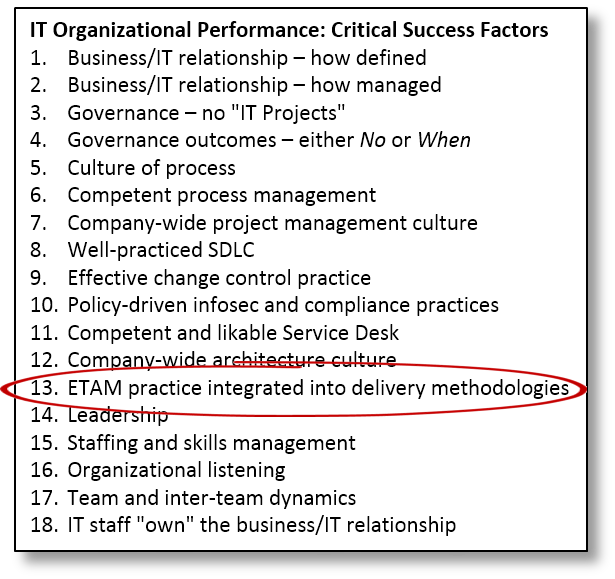
In case it isn’t obvious by now, knowing how to nibble away at the problem on a project-by-project basis without adding to the mess is one of IT’s 18 critical success factors.

Only “ETAM integrated into delivery methodologies” sounds a lot more impressive, doesn’t it?