Leaders encourage. Managers direct. Leaders foster. Managers enforce.

With the best leadership, employees don’t realize they’re following — they’re going where they want to go. The management alternative? Employees don’t think they have a choice in the matter.

Am I being fair? Not entirely. Leaders and managers are the same people. Management gets work out the door. Leadership gets people to follow. So in the context of business, leadership is a tool that lets managers get the same or better results without having to work so hard.

Which brings us to our next two IT critical success factors … two factors that at first blush might not seem to have much in common. They are a competent and likable service desk; and a culture of architecture, not only in IT but throughout the business.
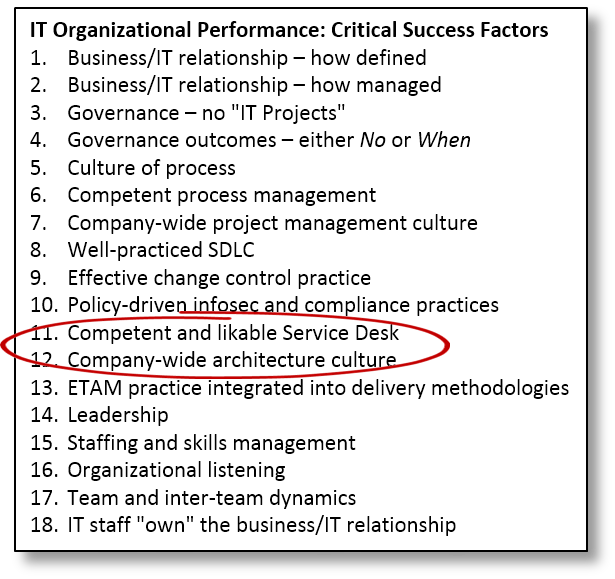
What they have in common: They’re both about getting people to go where IT wants them to go with no sense of coercion.

Service desk

The service desk is also known as the help desk, except where it’s known as the helpless desk.

The service desk is the most important part of the IT organization. If this point isn’t clear, re-read the article that launched this series: “In IT, relationships come first,” (KJR, 3/25/2013).

Or just re-read the title.

Relationships come first, because if IT’s relationship with the business is broken, it can’t succeed at anything. The people we depend on throughout the rest of the business will see to that. Distrust has that effect.

The relationship between IT and the rest of the business improves or deteriorates every time one employee in IT interacts with one employee outside IT. Enter the service desk. Its staff interactions with employees throughout the business more than any other part of IT, which means it has more impact on the relationship between IT and the rest of the business than any other part of IT.

If service desk staff aren’t competent, IT looks incompetent every time they try to fix a problem. Take it another step: If the service desk staff aren’t likeable, this will reflect on the impression business employees have of IT. Not just the service desk. All of IT.

One more thing: Employees contact the service desk when they need help … which is why “help desk” is probably the better name. And in case this has escaped anyone’s attention, they’re contacting the help desk because something has gone wrong with the information technology they use to get their jobs done.

Which means they’re generally a bit tense, and like most people who are tense because something has gone wrong, their inclination is to find someone to blame. Like, for example, IT, which put the ferschlugginer technology that’s misbehaving on their desk in the first place.

Which in turn leads to the single most common piece of advice I’ve given my CIO clients since I first started consulting: If the business/IT relationship is broken, fix the service desk first.

Architecture culture

When IT has finished singing, dancing, and playing the tuba, the outcome of enterprise technical architecture management is a collection of technology standards.

The point is to make sure the technical architecture facilitates whatever technology changes the company decides its needs instead of raising barriers, but the point is different from how IT gets to the point.

It gets to the point through the creation of standards, after which it really has just two ways to get everyone to comply with them: It can either create the architecture police, achieving compliance through enforcement, or it can foster a “culture of architecture,” at which point good architecture is “how we do things around here.”

Architectural standards have an intriguing property: They’re good for the business without being good for anyone in the business. The reason? Maintaining a strong architecture means today’s business sponsors have to spend more so that future business sponsors can spend less. So architecture is a hard sell.

Add to that one additional property: The nature of good architecture, and how it leads to lower costs in the future, is hard to explain convincingly in business terms, because it’s all about engineering, not cash flows.

Which is why successful ventures into technical architecture management require a culture of architecture that extends beyond IT, into the rest of the business.

Along with one more thing: A good relationship. Because for architecture to happen, they need to trust us, too.

Saturn was supposed to be a different kind of car company with a different kind of car.

It was, more or less. Mostly less. As Toyota discovered when it dissected one, the car’s engineering wasn’t all that good, and its construction wasn’t any better.

Once again, the Edison Ratio reigns supreme: Genius is only one percent inspiration. The rest is sweating the details.

Not that Windows 8 is as bad as you might have heard (how’s that for a segue?). Even without a touch screen it’s far from horrible.

It’s just that The User Interface Formerly Known As Metro (TIFKAM, which, not that it matters, we should introduce to the performer formerly known as “the performer formerly known as Prince”) is pointless on a laptop or desktop system, leaving us with a Start-button-free desktop that is otherwise just like Windows 7 only with fewer cosmetic flourishes.

Microsoft’s Windows 8 design dilemma began with its decision to create a new device classification — the “laplet,” or convertible laptop/tablet computer.

I love the idea, right up until, when I’m traveling with my iPad, I have to use LogMeIn to do something on my computer back home. That’s when I realize a tablet-size screen is too small for how I work on a laptop or desktop system. So I try to do the work using native iPad apps instead. That’s when I realize just how much less productive I am when I can’t have multiple windows open.

There might not be a better solution than the dual-mode user interface Microsoft ended up with. If there is one, I have no thoughts on what it might look like. I’d suggest Kinect, but can you imagine a business meeting where everyone in the conference room gestures to interact with their tablets?

But this week’s topic isn’t TIFKAM. Our issue this week is that, while both Apple and Microsoft have been busily focusing their time and attention on the user interface, they’ve been ignoring, for more than two decades, what business needs most when it comes to personal technologies.

That’s finally figuring out how to preserve user autonomy for personal computing while simultaneously integrating personal technologies into the enterprise technical architecture.

The original personal computer was a 100 percent detached device. It stood alone, with no connection to the rest of the enterprise technical architecture (which, back then, consisted of one or more mainframe computers) beyond re-keying data from printed reports into an electronic spreadsheet.

No integration with anything else meant there was no need to restrict what employees could do with the gadget, any more than there was a need to restrict what they could do with a 10-key calculator or typewriter.

But then, local area networks happened, followed by the widespread adoption of electronic mail and the advent of n-tier software architectures. We woke up to discover that desktop computers now interacted directly with … everything.

With PCs so thoroughly integrated into both the enterprise technical architecture and business processes and practices, “do whatever you want” was no longer a viable approach to information security and enterprise risk management.

Most businesses, following the advice of an army of consultants whose sole concern was security, adopted a lock-’em-down philosophy for personal technologies. The result was membership in the Value Prevention Society, where risk prevention trumps everything else, including the cost of lost innovation and overall organizational effectiveness.

Businesses that resisted this trend, doing what they could to leave the “personal” in personal computing, faced the same trade-offs. They just accepted more risk in exchange for more employee freedom to fiddle around.

But why should they have to? Establishing multiple log-ins or virtual machines for employees that provide more flexible levels of freedom shouldn’t be all that difficult: In addition to total lock-down login, another might include install-level control coupled with restrictions on what corporate data can be accessed, and yet another might be completely open, except for being totally walled off from any corporate resources.

Maybe you can do this now. I’m not a master of Windows administration. The technology might already be in place, and all that’s needed is the right combination of settings.

But whether the problem is missing technology or missing guidance, Microsoft’s customers would benefit more from its providing this sort of industry leadership than from it further tweaking the laplet user interface.